With the traditional approach, receiving and evaluating proposals is tedious and involves cumbersome spreadsheets. With Globality, you can effortlessly perform cost analysis and evaluate proposals to drive substantial value for your company.
Review and compare proposals
1. You will be notified via email when proposals are ready for your review. You can view a single proposal by navigating to the respective provider's overview and clicking on the proposal that you wish to view.
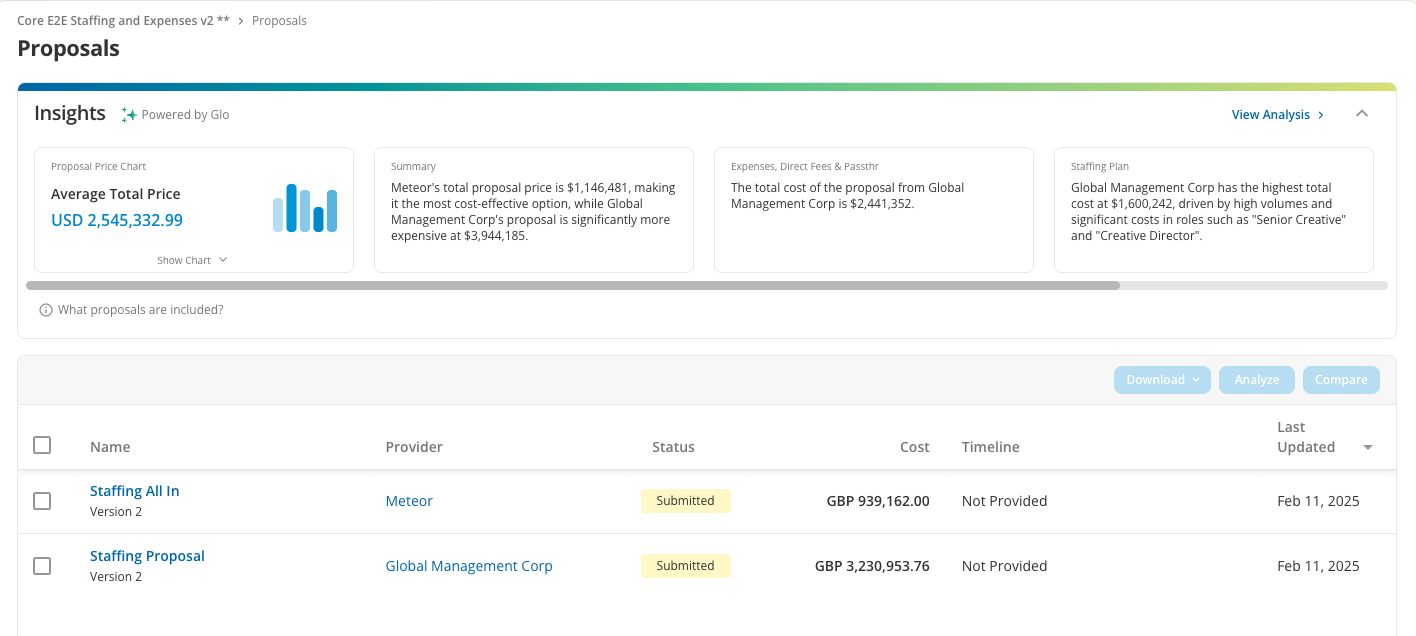
2. You can view and compare the latest version of all proposals by clicking on the "Proposals" link in the project navigation panel. From here you can organize the list in ascending or descending order by category (e.g., cost, timeline). To compare specific proposals, check the box next to each provider you wish to compare and click "Compare."
3. To compare proposals along with other information (e.g., company information, assessments), click on the "Providers" link and then the "Compare Providers" tab at the top.
4. To compare commercial information and timelines, navigate to the Insights area at the top of the Proposals section within the project. Click "View Analysis" to view the full analyses and download the analysis documents.
5. Once you have reviewed proposals and compared providers, you may want to complete assessments to formally score and evaluate providers before making your award decision. Assessments can be accessed from the Providers section of the project.
6. When you are ready to approve a proposal, navigate to the respective provider's proposal and click "Approve Proposal".
Was this article helpful?
That’s Great!
Thank you for your feedback
Sorry! We couldn't be helpful
Thank you for your feedback
Feedback sent
We appreciate your effort and will try to fix the article