Follow best practices for structuring file-based pricing templates to enable automated insights and analysis from Glo. 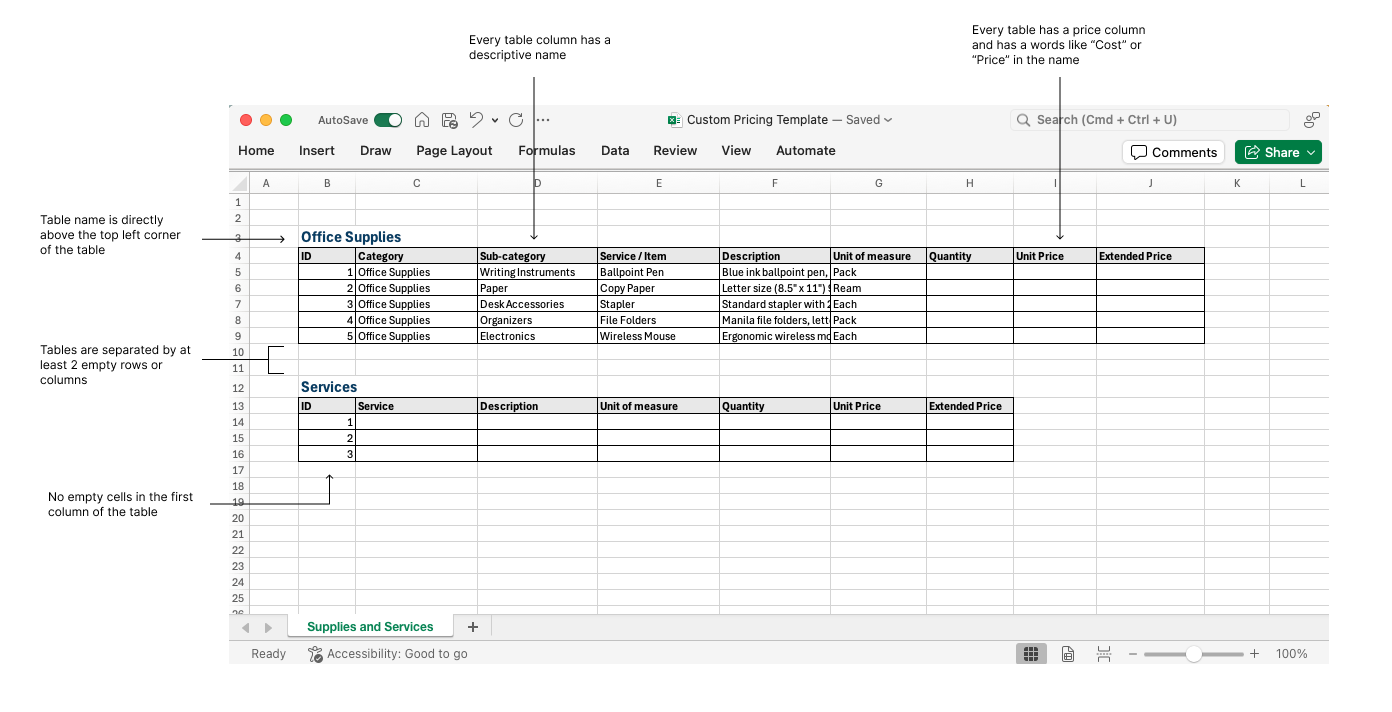
- Use Excel file type to capture line item pricing.
- Tables within a single sheet should be separated by at least 2 empty rows or columns.
- Each table has at least one price column and should be clearly named with words like "cost" or "price"
- All line items within the pricing template use a single currency.
- There are no empty cells in the first column of the table.
- All values in a table column have consistent data format (e.g. text, date, number, currency).
Additional considerations:
- Avoid merged cells.
- Avoid section separators and subtotals.
- Avoid multiple row headers.
- Avoid abbreviations and acronyms in column headers.
- Hidden rows and columns will be ignored.
Was this article helpful?
That’s Great!
Thank you for your feedback
Sorry! We couldn't be helpful
Thank you for your feedback
Feedback sent
We appreciate your effort and will try to fix the article