Yes. You can move a project to a Completed State.
Project owners and administrators can complete a project from the Project Overview page. This is available for any project where at least one supplier has been invited (otherwise "Cancel" might be a more suitable option). The user can choose whether this change will be sent as an email to suppliers (the change is visible on the supplier application regardless of whether the email notification has been sent). The project team on the client side will always receive an email notification.

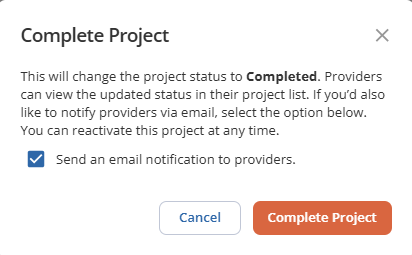
A completed project can be reactivated if needed, and you can seamlessly act on the next steps from where you left off.
In the Project List View, you can easily review which projects were completed as well as filter by this status. Administrators with access to data reporting can pull reports that reflect this status and further analyze the data.
This feature makes it easy to filter completed projects for reporting use cases such as calculating estimated spend to drive organizational buying excellence.
Was this article helpful?
That’s Great!
Thank you for your feedback
Sorry! We couldn't be helpful
Thank you for your feedback
Feedback sent
We appreciate your effort and will try to fix the article